AI is not a tab.
It runs the work.
Rentari AI drafts the listing, answers the prospect, screens the applicant, writes the lease, chases the rent, triages the repair, and prepares the renewal, all from your own records. You approve. One platform, one login, one price, with the audit trail underneath.
Get your evenings back. The paperwork is written before you sit down to it.
Grow without hiring. The same you, running more doors.
Answers you can check. Every one cites the record it came from.
You stay in control. Nothing sends, charges, or files until you say so.
 Rentari AI
Your records, plus your rules. That is the whole trick.
An assistant is only as good as what it can see and what it is allowed to do. Rentari holds the whole record in one system and lets you set how far the AI goes on each job.
One system, not five that sync overnight.
- Leases, tenants, and the live ledger
- Applications, screening, and documents
- Maintenance history and your vendor list
- Rent, deposits, and every payment
- Yours to export, any time you want
Work that runs the way you would run it.
- 37 automations across 11 areas
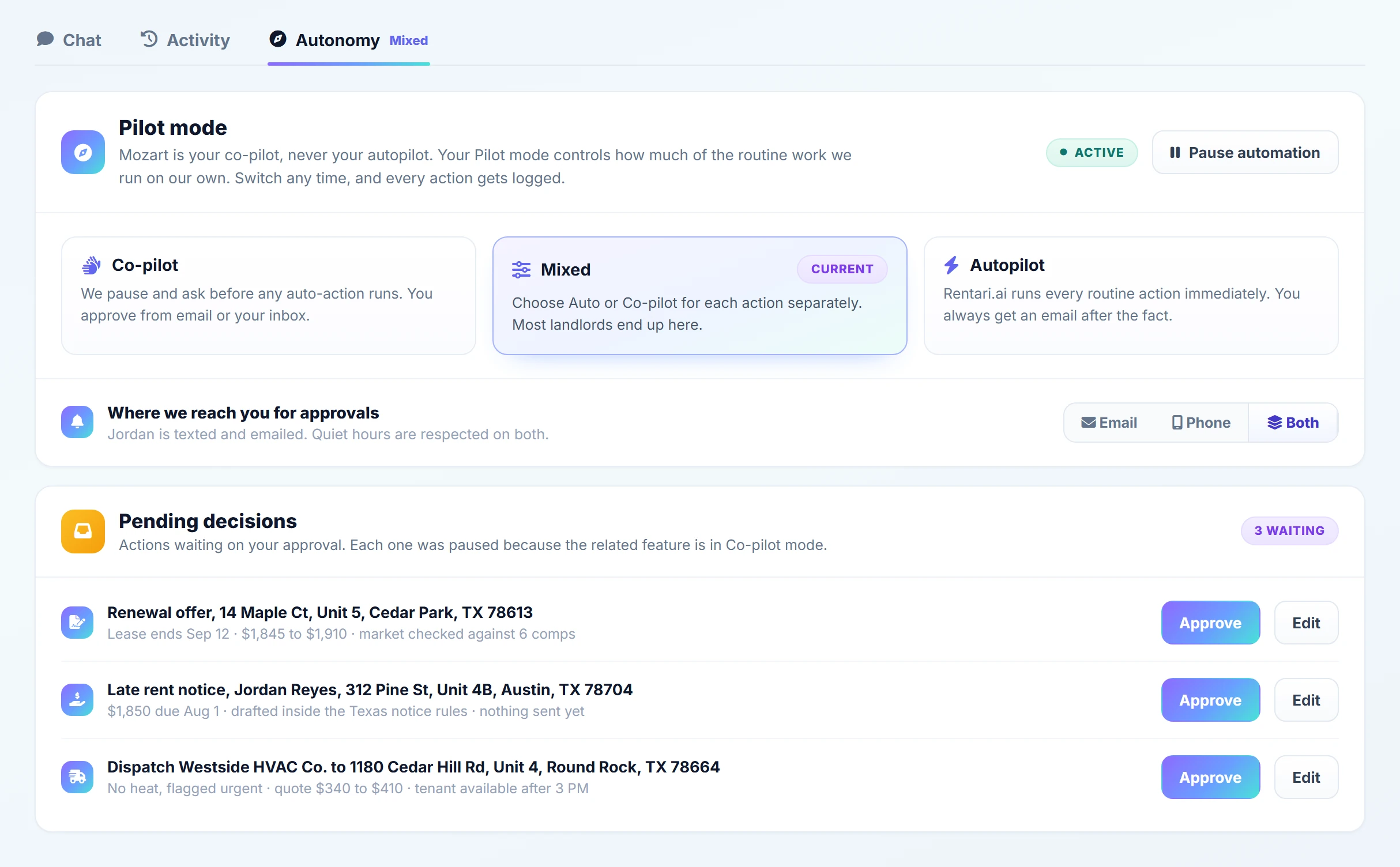
- Co-pilot, Mixed, or Autopilot, per job
- Your state's notice rules, applied by default
- Your runbooks for heat, leaks, and lockouts
- Money and irreversible steps stay locked
The work is done before you open the laptop.
- The notice is written, and cites the lease
- The repair is triaged and the vendor is briefed
- The prospect got an answer in minutes
- The books are coded and the report is ready
- You read it, and you press approve
Most AI answers questions. This one finishes tasks.
A chatbot that explains what a late notice should say still leaves you to write it. Rentari AI prepares the actual notice, the actual lease, the actual ticket, the actual renewal offer, filled in with the right tenant, the right amount, and the right state rules, then puts it in front of you ready to send.
Set how far the AI goes, one job at a time.
Every automation carries a Pilot mode you choose. Co-pilot drafts and waits. Mixed handles the routine and escalates anything unusual. Autopilot runs it end to end. Start on Co-pilot everywhere, then hand over the jobs you stop checking. Anything that moves money or cannot be undone can never be set to Autopilot, by design.
It cites the record, or it says it does not know.
Every answer traces back to a real record you can open. When a fact is not on file, Rentari AI tells you and points you to the page to add it, instead of inventing a number. Sensitive identity details like a Social Security number or date of birth are never sent to the model, and every draft is stored beside the decision you made on it.
A look inside Rentari AI.
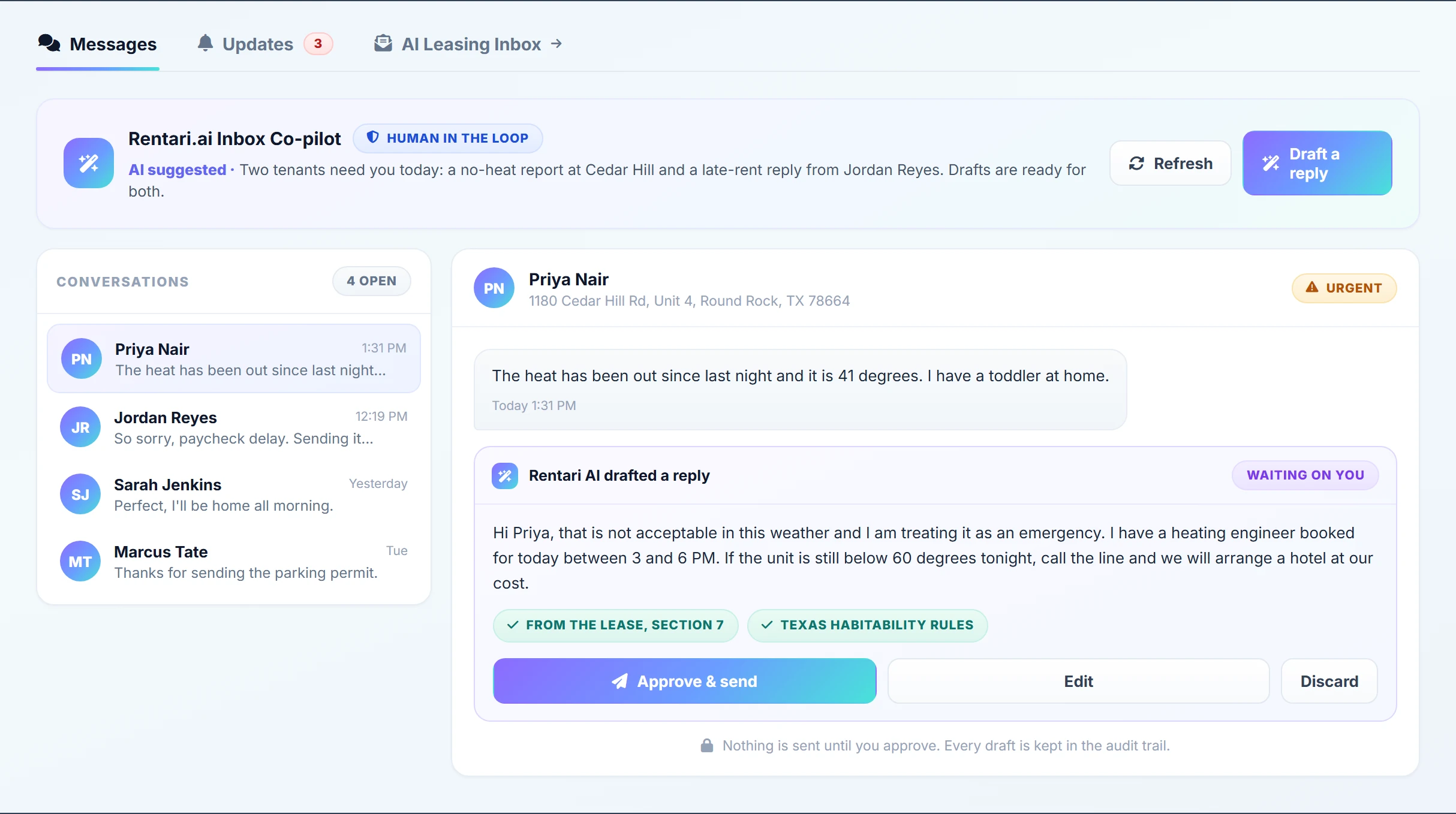
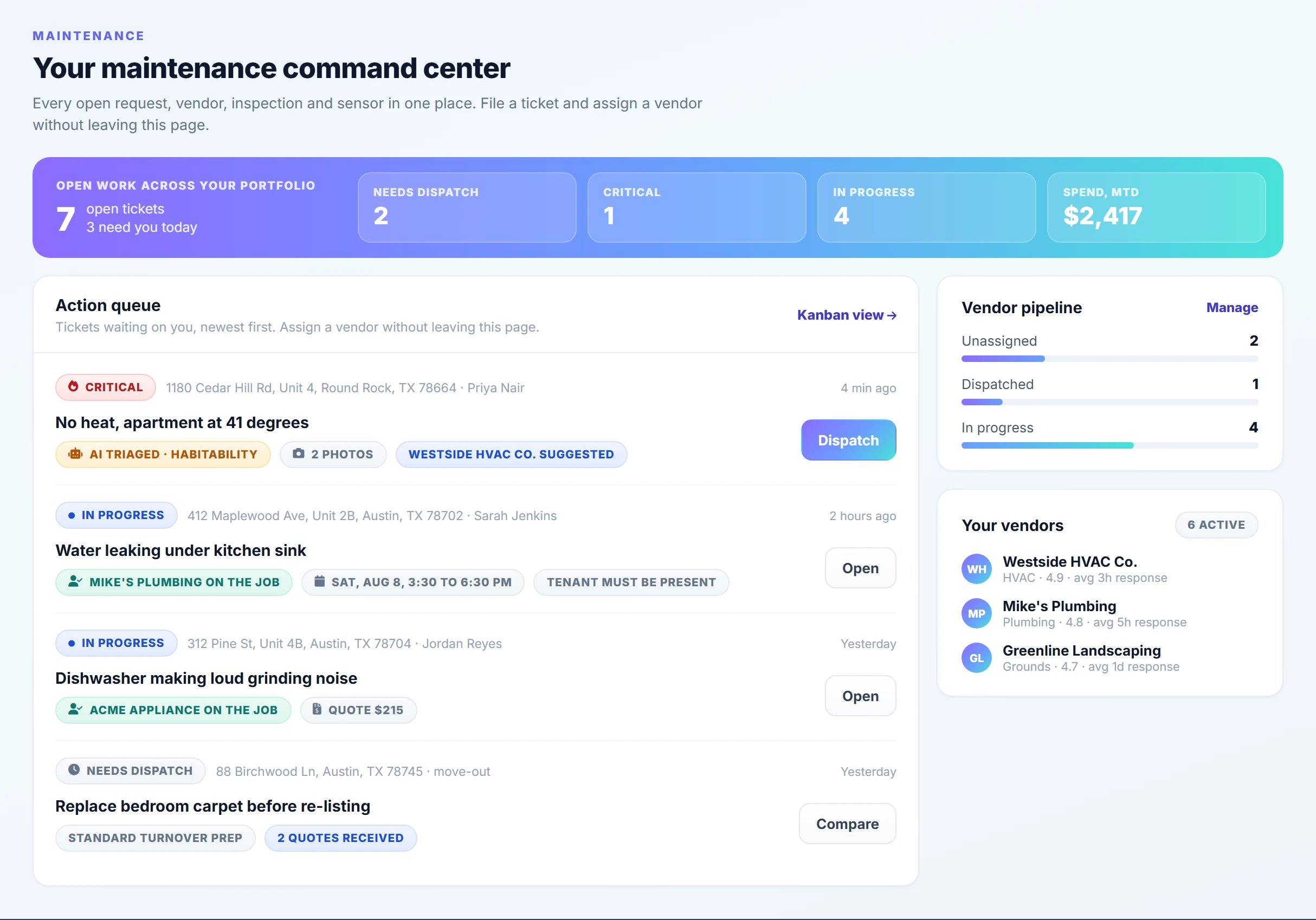
The screens you work in, with a full portfolio loaded. Open the demo and use them yourself.
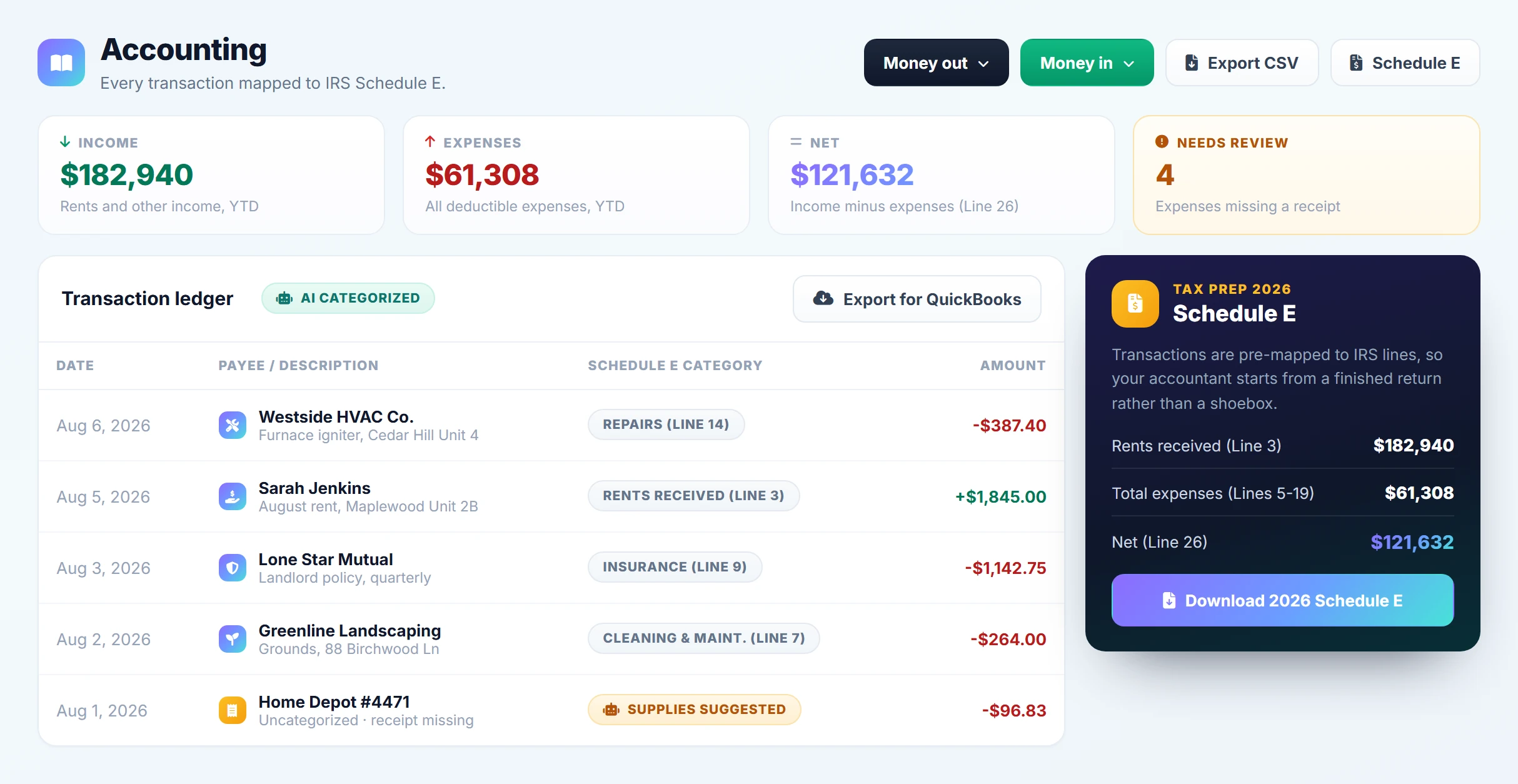
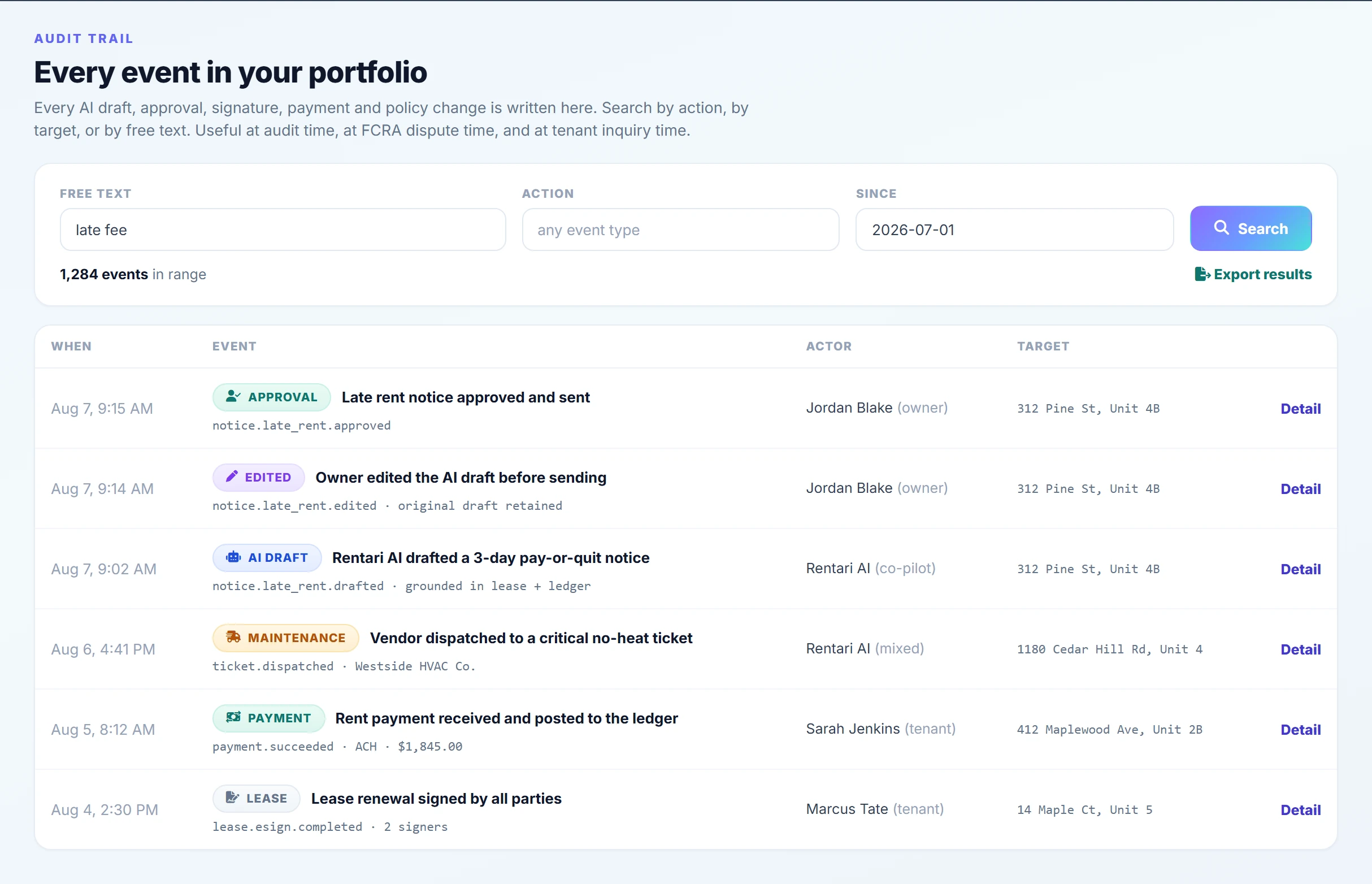
Rentari AI is already inside every workflow you run.
Not a single assistant bolted onto the side. Each of these has AI doing the first draft, and each one is included in the same plan.
Leasing inbox
Iris answers rental inquiries from Zillow, email, and your site in minutes, then books the showing.
Listing descriptions
Write a listing from the unit's own details, in your tone, ready to publish everywhere.
Syndication
Push the listing to the big rental sites and pull every lead back into one inbox.
Tenant screening
Credit, eviction, and background come back summarized, with an FCRA-safe path for a decline.
Income and ID checks
Read pay stubs and bank statements, verify identity, and flag what does not add up.
State-specific leases
Draft the lease with the clauses your state requires, filled in from the application.
E-sign and documents
Route it for signature, chase the signer who stalled, and file the executed copy.
Rent collection
Reminders before the due date, a late notice inside your state's rules, and the ledger kept straight.
Accounting
Categorize the transaction, code the vendor bill to the right property, and reconcile as you go.
Reports and Schedule E
Ask for the report in plain English and get the numbers, ready for your accountant.
Maintenance triage
Ask the right follow-up questions, capture photos, and rank the emergency above the drip.
Maintenance runbooks
Your rules for no heat, a leak, or a lockout, followed the same way every single time.
Vendor dispatch
Send the job to the right trade, collect the bids, and keep the tenant updated.
Ask your portfolio
Who is late, which unit is vacant, what did Maple Street cost. One box, cited answers.
The phone line
Luna picks up when a tenant calls about a repair, and a ticket is waiting for you.
Four assistants, one portfolio.
They share the same records, so nothing has to be explained twice. Each one has a job and a boundary.
Runs the portfolio with you. Drafts notices, renewals, and reports, answers questions about any record, and hands every action back for approval.
Meet MozartAnswers prospects the moment they write in, from the listing's own facts. Books showings, and never guesses about pets, parking, or price.
See the leasing inboxAnswers tenants from their own lease, in the app or on the phone. When the lease does not say, she asks you instead of making it up.
Meet LunaReads the leases, screening reports, and files you upload, and pulls the clause or the number back out when you ask for it.
Ask your documentsBolted-on AI, or built in from the start.
Most property software added an assistant to a product designed before AI existed. Rentari was built the other way around.
- AI lives on one screen, and the rest of the product is unchanged
- Sold as an extra module, an AI seat, or a credit pack
- Answers are generic, because the assistant cannot see your ledger
- You still re-key the same data between modules
- It suggests, and you go somewhere else to do the work
- No record of what it proposed once you close the tab
- 37 automations across 11 areas, on by default
- Included in the plan. No AI seat, no credits, no upgrade gate
- Grounded in your own leases, ledger, and documents, with the source cited
- One system, so the data is already there
- It prepares the finished action and waits on your approval
- Every draft and approval kept in a timestamped audit trail
Or bring the AI you already use.
Rentari runs a Model Context Protocol server, so Claude, ChatGPT, Cursor, or your own in-house assistant can read your portfolio, and write to it when you allow that. You issue a scoped key, you choose what it can touch, and every action lands in the same audit trail.
The questions everyone asks first.
Is Rentari AI a separate add-on?
Does the AI act on its own?
Where do the answers come from?
What data is sent to the AI model?
Can I use my own AI assistant with Rentari?
Is there a record of what the AI did?
See what it has already done for you.
Open the demo portfolio and look at the work waiting for approval: the drafted renewal, the triaged repair, the late notice ready to send. No card, no setup, no call to book.
From $8 a month for up to 5 units. Every AI feature included.